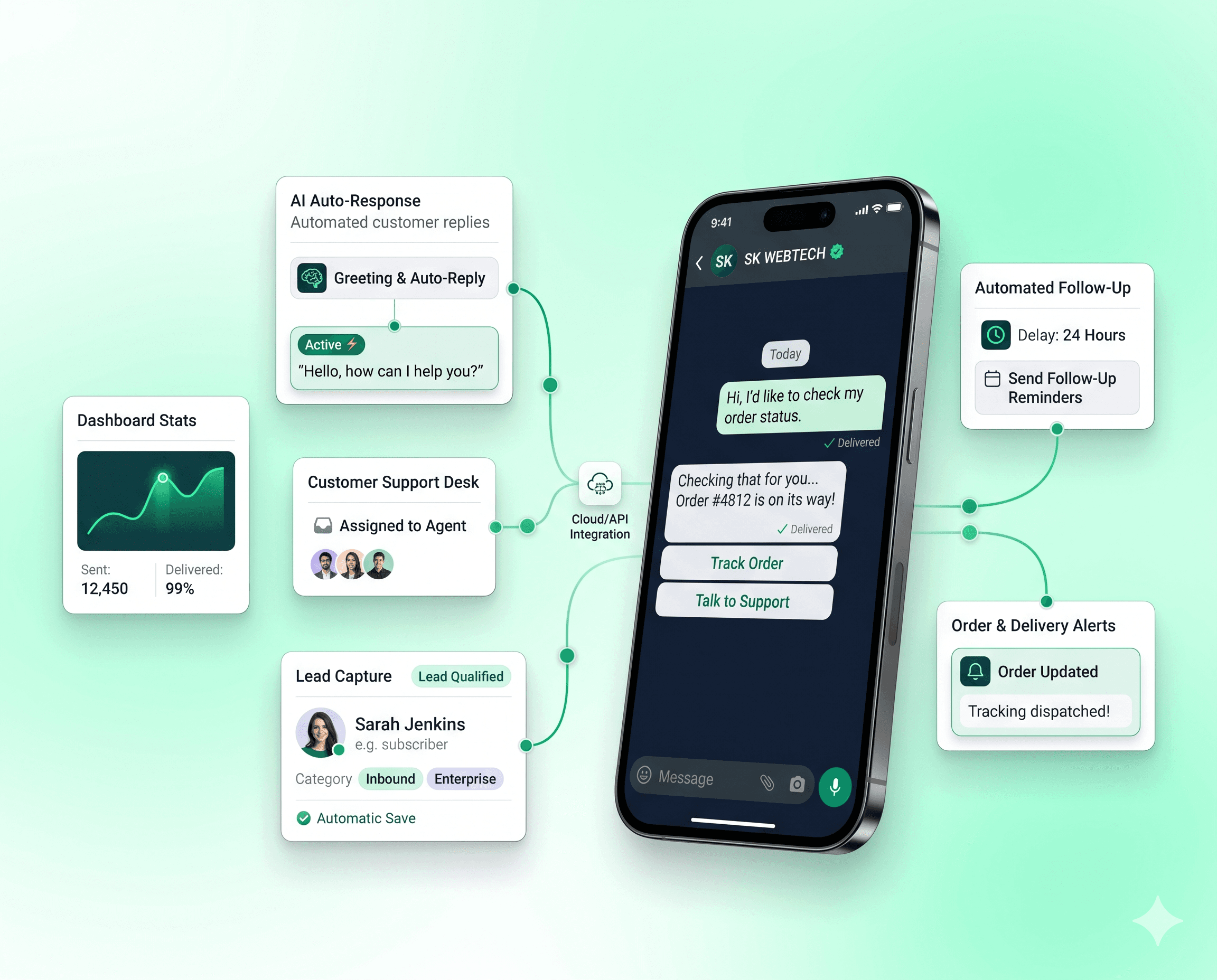
WhatsApp Automation Platform for Business
SK WEBTECH helps your business automate WhatsApp conversations, customer support, lead follow-ups, notifications, campaigns and sales — on the official WhatsApp Business Platform, from one dashboard.
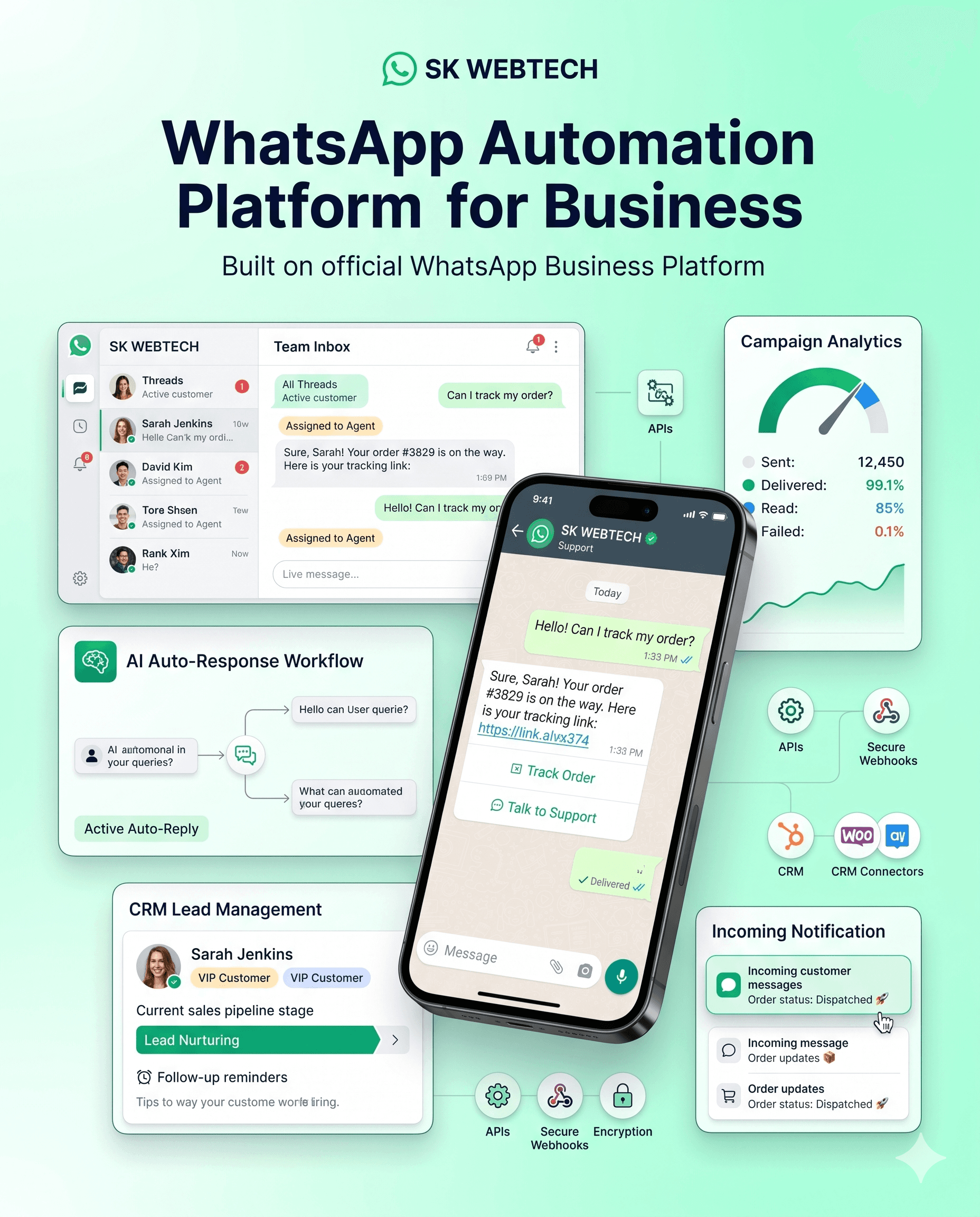
What is WhatsApp Automation?
WhatsApp automation means letting software handle the WhatsApp conversations and messages your team currently manages by hand. When a customer says “hi”, asks for your price list or places an order, the right response goes out automatically — in seconds, at any hour.
A WhatsApp automation tool works from triggers and actions. A trigger can be a customer message, a button tap, or an event in your website or CRM. The action can be a reply, a chatbot flow, a notification, a CRM update — or handing the conversation to a human agent with full context.
The result: customers get faster answers, your team stops retyping the same responses, and no lead slips through because someone was busy. Automation handles the repetitive work; people handle the conversations that actually need them.
With automation, your business can automatically:
- Reply to customers instantly, any time of day
- Capture lead details from every conversation
- Qualify leads with automated questions
- Send follow-ups that never get forgotten
- Send appointment and payment reminders
- Resolve common support queries automatically
- Send order, delivery and payment notifications
- Route conversations to the right agent
- Trigger messages from CRM or website events
How a conversation flows through automation
WhatsApp Automation Features
Everything you need to run WhatsApp marketing automation, chatbot automation and customer support automation from a single platform.
Automated WhatsApp Replies
Answer common questions the moment they arrive with keyword rules, welcome messages and away messages — no customer left waiting.
WhatsApp Chatbot
Build conversational chatbots with a drag-and-drop flow builder — buttons, list menus, conditions and branching, without writing code.
AI-Powered Customer Support
Let AI handle first-line support conversations naturally, then hand over to a human agent the moment a query needs one.
Lead Capture & Qualification
Ask qualifying questions automatically, save answers to the contact profile and tag leads by intent — every enquiry becomes structured data.
Automated Follow-Ups
Re-engage leads with scheduled template messages so a busy day never costs you a deal that just needed one more nudge.
WhatsApp Campaign Automation
Send approved template campaigns to segmented audiences and track delivery, reads and replies in real time.
Customer Notifications
Trigger order confirmations, shipping updates and payment alerts automatically from your store, website or backend.
Appointment & Reminder Automation
Confirm bookings instantly and send timely reminders that reduce no-shows for clinics, salons, classes and consultations.
Team Inbox
Your whole team on one WhatsApp number — assign, transfer and resolve conversations the automation hands over.
CRM Integration
Every contact, attribute and conversation lands in the built-in CRM — or syncs to your existing CRM through the API.
Webhook & API Automation
Send messages with a single HTTP call and receive inbound events as webhooks — connect any system you already run.
Analytics & Reporting
See delivery, read and response rates per campaign, chatbot resolution rates and agent performance in one dashboard.
How WhatsApp Automation works
From the first message to a closed conversation — five steps, mostly on autopilot.
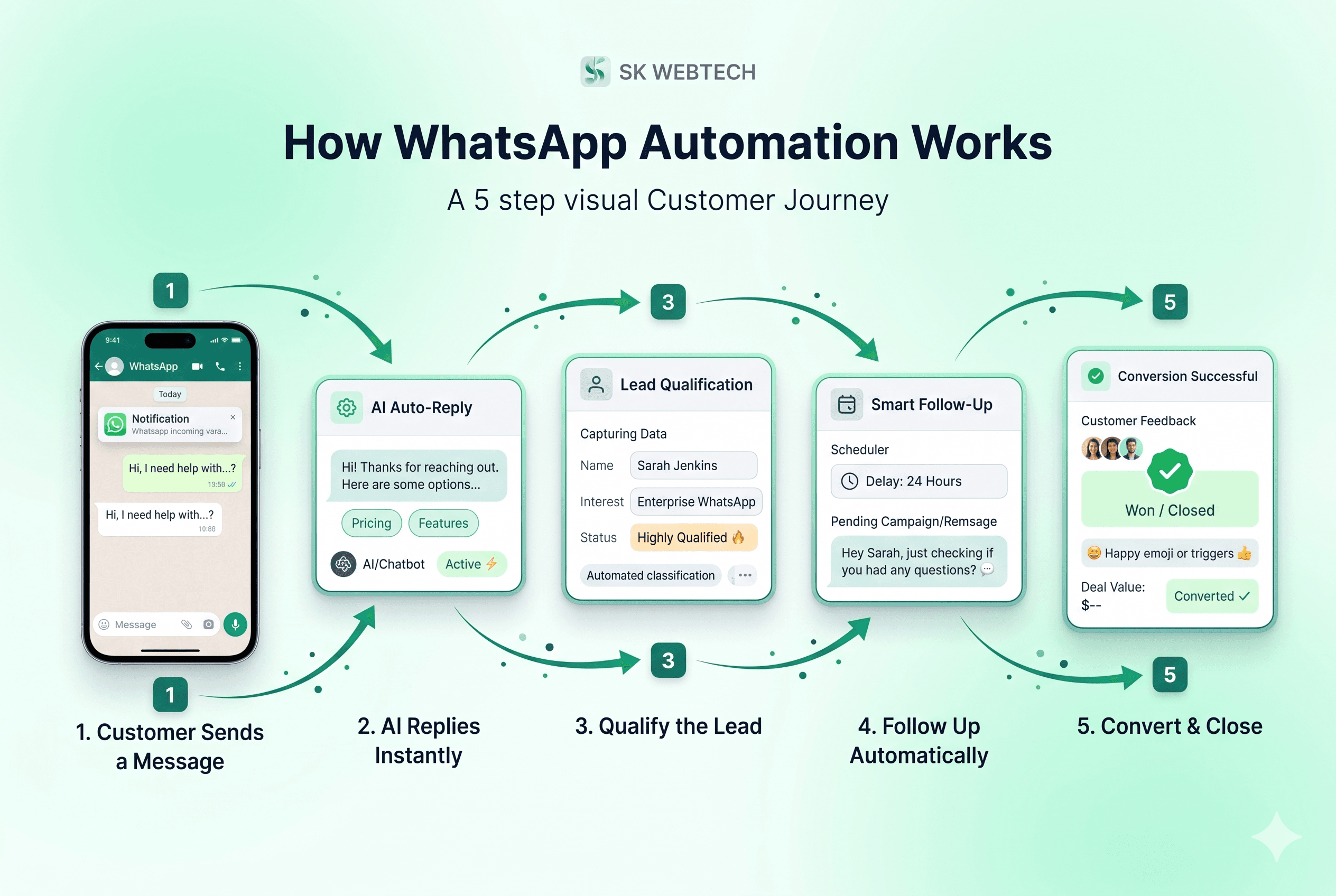
01
Customer contacts you on WhatsApp
A customer messages your business number — or an event fires from your website, store or CRM, like a new order or an abandoned form.
02
Automation identifies the message or event
The platform matches what happened against your triggers — a keyword, a button tap, a chatbot flow step or an incoming webhook.
03
The system responds or acts instantly
An automated reply goes out, a chatbot flow starts, a template notification is sent, or an internal action runs — within seconds.
04
Data is stored and synced to your CRM
Names, phone numbers, answers and tags are saved to the contact profile and pushed to your CRM or database automatically.
05
A human agent takes over when needed
When a conversation needs judgement, it is routed to your team inbox with full context — the customer never repeats themselves.
WhatsApp Automation Use Cases
WhatsApp automation for business isn't one thing — it's whatever repetitive conversation your team has most often. Here's where it earns its keep.
Lead Generation
Turn every click-to-chat ad and website visitor into a captured, qualified lead — automatically, even outside business hours.
Sales Follow-Up
Schedule follow-up sequences so warm leads hear from you again before they go cold or buy from a competitor.
Customer Support
Resolve repetitive questions — pricing, timings, order status — instantly, and free your agents for issues that need a human.
E-commerce
Send order confirmations, shipping updates and delivery alerts, and recover abandoned carts with timely WhatsApp nudges.
Real Estate
Qualify property enquiries by budget, location and timeline before they ever reach an agent's phone.
Education
Handle admission enquiries, share brochures and fee details instantly, and remind parents about deadlines and classes.
Healthcare
Confirm appointments, send visit reminders and share reports securely — fewer no-shows, fewer phone calls.
Service Businesses
Book jobs, send technician updates and collect confirmations on the channel your customers already use daily.
Appointment Booking
Let customers pick a slot inside a WhatsApp conversation and get an instant confirmation — no calls, no back-and-forth.
Order Updates
Keep buyers informed at every stage — placed, packed, shipped, delivered — without a single manual message.
Payment Notifications
Send payment links, receipts and due-date reminders automatically, and reduce the follow-up calls your team makes.
Customer Feedback
Ask for ratings and reviews right after delivery or service completion, while the experience is still fresh.
WhatsApp Automation for Lead Generation
The automated lead journey
Most leads don't die because they weren't interested — they die because the first response came too late. With WhatsApp lead automation, every visitor who taps a WhatsApp click-to-chat link in an ad or a WhatsApp chat button on your website gets an instant greeting and a short set of qualifying questions: what they need, their budget, their timeline.
Answers are saved as attributes and tags on the contact, the lead is pushed to your CRM, and your sales team is notified with the full conversation attached. Follow-up messages go out on schedule until the lead replies or books. Your salespeople spend their day talking to qualified prospects — not chasing cold numbers or copying chats into spreadsheets.
WhatsApp Business API + Automation
The WhatsApp Business Platform (Cloud API) is Meta's official way for businesses to send and receive WhatsApp messages programmatically. It is what makes serious WhatsApp Business API automation possible: multiple agents on one number, approved template messages, event webhooks and reliable delivery at scale.
SK WEBTECH sits on top of this official API, so the automation you build stays compliant with WhatsApp's business policies — and can connect to the systems your business already runs:
A new order, a form submission, a payment received — any event in any of these systems can trigger a WhatsApp message, and any WhatsApp reply can flow back as data.
Built for how businesses actually work
SK WEBTECH is a technology platform for building WhatsApp-based automation workflows — from a simple auto-reply to a full pipeline of chatbot, CRM, campaigns and APIs. You start small, automate one conversation, and grow from there.
Transparent pricing, onboarding help in English and Hindi, and a team you can reach on WhatsApp — on the same platform we sell.
Automation vs manual WhatsApp messaging
Manual messaging works — until volume, off-hours and follow-ups pile up. Here's the honest difference.
| Aspect | Manual messaging | WhatsApp automation |
|---|---|---|
| Response time | Depends on who is free — often hours | Instant automated replies, 24/7 |
| Follow-ups | Tracked by memory; easy to forget | Scheduled and triggered automatically |
| Lead management | Numbers scattered across personal phones | Every lead captured, tagged and synced to CRM |
| Customer support | Agents retype the same answers all day | Chatbot resolves FAQs; agents handle exceptions |
| Scalability | Limited by team size and working hours | Handles thousands of conversations at once |
| Notifications | Sent one by one, if at all | Order, payment and reminder alerts fire on events |
| CRM integration | Manual copy-paste between apps | Native sync through APIs and webhooks |
| Reporting | No visibility into what was sent or read | Delivery, read and response analytics built in |
| Human effort | High and repetitive | Focused on conversations that need people |
Benefits of WhatsApp Automation
No magic promises — these are the practical gains businesses see when repetitive WhatsApp work moves to automation.
Faster customer response
Customers get an answer in seconds instead of waiting for an agent to be free.
Less repetitive manual work
The same ten questions stop consuming your team's day.
Better lead follow-up
Every enquiry gets a timely, consistent follow-up — automatically.
Improved customer experience
Quick, helpful replies on the app your customers already open daily.
Centralized communication
One number, one inbox, one history — instead of scattered personal chats.
Automated notifications
Orders, payments and appointments keep customers informed without effort.
Better sales workflow
Qualified leads reach your sales team with context already attached.
24/7 automated responses
Your business answers at midnight, on weekends and on holidays.
Easy CRM integration
Conversation data flows into your CRM instead of dying in a chat thread.
Room to scale
Growing volume means adjusting flows — not hiring another shift.
What is WhatsApp Automation?
WhatsApp automation is the use of software to send and respond to WhatsApp messages automatically. Instead of an agent typing every reply, an automation platform answers common questions, captures lead details, sends follow-ups, reminders and notifications, and routes conversations to your team when a human touch is needed.
How does WhatsApp Automation work?
It runs on the official WhatsApp Business Platform. When a customer messages you — or an event fires in your website, store or CRM — the platform matches a trigger such as a keyword, button tap or webhook, and executes an action: sending a reply, running a chatbot flow, updating the CRM or notifying an agent.
What is WhatsApp Business Automation?
WhatsApp business automation applies automation to your whole customer lifecycle on WhatsApp — marketing campaigns, lead capture, sales follow-up, transactional notifications and customer support — on a single business number, with a team inbox handling everything the automation hands over.
Can I automate WhatsApp replies?
Yes. Keyword rules and chatbot flows answer frequently asked questions instantly, welcome and away messages cover business hours, and approved template messages let you reach out proactively — all within WhatsApp's business messaging policies.
Can WhatsApp Automation generate leads?
Yes. A chatbot can greet every visitor from your ads or website, ask qualifying questions, save the answers to a contact profile and alert your sales team. Automation doesn't replace salespeople — it makes sure no enquiry goes unanswered or cold.
Can WhatsApp be connected to a CRM?
Yes. SK WEBTECH includes a built-in CRM for contacts, tags and attributes, and its API and webhooks let you sync leads and conversation events with an external CRM, ERP or database in real time.
What is WhatsApp Business API automation?
The WhatsApp Business API (Cloud API) is Meta's official interface for businesses to send and receive WhatsApp messages programmatically. Automation built on it is compliant and scalable, supports multiple agents on one number, and avoids the account risks of unofficial tools that script the consumer app.
Can I automate WhatsApp follow-ups?
Yes. Within the 24-hour customer service window you can send free-form follow-ups automatically, and outside it you can schedule pre-approved template messages — so follow-up sequences stay both automatic and policy-compliant.
Is WhatsApp Automation suitable for small businesses?
Very much so — small teams often see the biggest gains, because automation covers the hours and volume they can't. SK WEBTECH starts with a free trial, so a small business can automate replies and follow-ups before committing to a paid plan.
How can I get started with WhatsApp Automation?
Create a free SK WEBTECH account, connect your WhatsApp Business number through Meta's embedded signup, and build your first automated reply or chatbot flow from the dashboard. If you'd like a walkthrough first, book a demo with our team.
What is the difference between WhatsApp Automation and a WhatsApp chatbot?
A chatbot is one component of automation — it handles the conversation itself. WhatsApp automation is broader: it also covers campaign scheduling, event-triggered notifications, CRM syncing, API-triggered messages and routing rules that decide when a human agent steps in.
Can WhatsApp Automation integrate with my website?
Yes. You can add click-to-chat buttons that start automated conversations, trigger WhatsApp messages when someone submits a form or places an order, and push captured lead data back to your site's backend through APIs and webhooks.
Start with the free tools, then automate
The fastest way to see automation work: give customers a way to message you first, then let the platform answer.
Free WhatsApp link generator (wa.me) with QR code
Create a click-to-chat link with a pre-filled message for your bio, ads and visiting card — no signup.
Free WhatsApp chat button for your website
One line of code adds a floating WhatsApp button to any site, so visitors start a chat your automation can answer.
All WhatsApp Business API platform features
Campaigns, visual flow builder, team inbox, WhatsApp calling, CRM, Google Sheets and developer APIs.
WhatsApp automation plans and pricing
Transparent monthly plans with a free trial, and official Meta message rates with zero markup.
Ready to automate your business on WhatsApp?
Automate customer conversations, leads, follow-ups, notifications and support with SK WEBTECH — on your own number, on the official WhatsApp Business Platform.